
Interactive Maps Solutions:
Elevating Operations with Intelligent Wayfinding & Data Analytics
What Defines a Truly Intelligent Interactive Map?
Beyond visually appealing graphics, the true power of an interactive map lies in its intelligence—its ability to provide comprehensive, relevant, and easily accessible information.

Dynamic Interactive Maps
Intuitive Navigation Systems
Augmented Reality (AR) Assistant
IoT Management & Assets Tracking
Smart Interactive Directories
Content Management System (CMS)
Benefits of Interactive Maps
Interactive maps transform complex spaces into easy-to-navigate environments, helping visitors find their way quickly while reducing staff interruptions.
Improve Visitor Experience
✓ Instant Access Anywhere – Empower users with maps that work seamlessly across kiosks, desktops, and mobile devices.
Operational Benefits
✓ Operational Efficiency – Reduce staff interruptions by automating directions and freeing them to focus on guest experience.
✓ Scalable Growth – Expand easily as your venue or organization evolves, with flexible deployment options.
Enhance visitor experiences with Interactive Maps

Wayfinding Kiosks Maps

Mobile Maps
Maps Beyond Navigation
Enhancing Operational Intelligence & Infrastructure Management

360 Virtual Visits & Facilities Management
This visual approach drastically reduces errors and miscommunication, clarifying work locations and requirements. Key benefits for facilities and operations managers include: Remote Monitoring, Signage Verification, Annotated Workflows, Efficient Task Assignment.

IoT Asset Tracking & Digital Infrastructure Management
Access historical data to analyze movement patterns and usage trends, providing invaluable insights for optimizing inventory levels, improving asset utilization, and enhancing operational security.
Our platform facilitates seamless integration with a multitude of IoT devices, enabling centralized data capture and management. Gain real-time visibility into equipment status directly on your interactive map.

Network Topology Mapping & Live Status
The map system also displays the live of status of each equipment, including an optimized view for IT departments for monitoring dashboards.
These 2 features empowers IT teams to proactively monitor network health, rapidly identify anomalies, and dispatch support personnel with unprecedented efficiency, significantly reducing downtime and optimizing maintenance workflows.

Installation information & Photos
Technical support personnel also have access to the map with a readonly view, to ensure maximum efficiency when performing on site maintenance.

Geolocalized Content Management: Smart Content Delivery
Thanks to geolocalized content, geofencing notifications can be triggered by different means (entering/exiting areas) and on different channels (app notification, Wi-Fi splash page, Website Customization, Digital Signage).
View the real-time status of each digital signage display, including currently broadcasted content, ensuring impactful and contextually relevant communications.
Technologies behind Interactive Maps
Built with scalable vector graphics, our maps load quickly on any device and support 360° images and AR views.
From high-end interactive kiosks to legacy mobile devices, our solutions guarantee a consistent and fluid user experience.

Accurate, Digitized Indoor Maps

Fully Editable Online Maps
Easily drag-and-drop elements , integrate 360-degree imagery, embed rich media, and update points of interest in real-time.
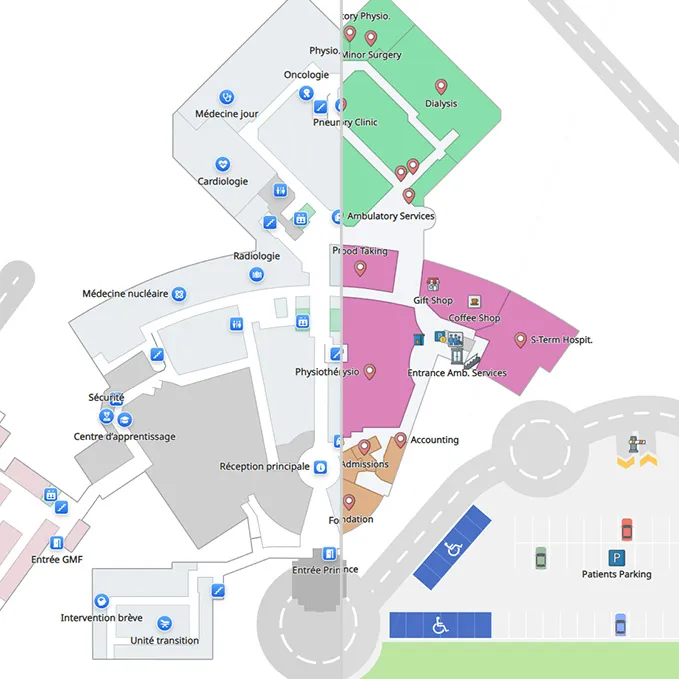
Branding and customization
Various visual details such as cars, trees, detailed parking can also be added on the map to ensure the best cognitive recognition when visitors are on site.
Your Map, Your Rules
Advanced Navigation Logic for Enhanced Security & User Flow
Time-Based Restrictions & Bi-Directional Instructions
Optimized Pathing: Guiding Users & Managing Crowd Flow
Access Control & Security: Granular Movement Management
One Map, Multiple Perspectives: Tailored Experiences Through Layered Information
Enhanced Visitor Experience: Intuitive Wayfinding for Guests
Employee Mode: Secured Access
IT Departments: Complete Infrastructure Monitoring
Employee Onboarding & Training
External Contractors
Why Eye-In Media is Your Strategic Partner for Interactive Maps Solutions
The Eye-In Media
Advantage
🏅Proven Expertise
Trusted by leading companies
⚙️Cutting-Edge Technology
3D mapping, AR, and AI integration
🛡️Proven Reliability
99.9% uptime guarantee
🎧Comprehensive Support
24/7 technical assistance

Discover the power of Smart Interactive Maps
Discover how Eye-In Media's integrated suite of digital solutions can further enhance your operational efficiency and user engagement thanks to Smart Maps.

Wayfinding Solutions

Interactive Directories

Product Finders
Network Topology Maps & Digital Inventory Management
Customer Journey & Maps Analytics
Proximity Marketing
Frequently Asked Questions
Discover more about Eye-In's Interactive Maps
- What makes Eye-In’s interactive maps “smart”?
They combine interactive maps with turn-by-turn navigation, augmented reality wayfinding, a searchable directory, digital inventory mapping, and a cloud CMS—so users get accurate context, not just a pretty map.
- How does this help IT operations beyond wayfinding?
IT teams can visualize network topology, map kiosks, digital signage, security devices, and IoT sensors—down to switch/port relationships—then monitor live status and dispatch support faster.
- Can we see where equipment (e.g., wheelchairs, carts) is located?
Yes. Geolocated inventory tracking shows real-time locations and historical movement, helping reduce loss, speed retrieval, and inform utilization planning.
- Can we enforce access rules and safety routes in navigation?
You can define restricted areas, time-based access, evacuation-only routes, and location-specific instructions for entering vs. exiting—so the path matches policy and safety needs.
- Do you support different experiences for guests and staff?Yes. Offer a simple Guest Mode for visitors and an authenticated Employee Mode with alternate/faster internal routes and role-specific tools.
- Does it help with onboarding new employees?
Create a self-guided onboarding tour with map layers for building access, departments, services, and parking—linking documentation to each map item for a faster ramp-up.
- What industries and use cases do you support?
Hospitals, campuses, airports, convention centers, retail, and corporate facilities—covering visitor wayfinding, employee workflows, asset tracking, room booking, and digital signage control.
- Can our team edit the maps without a developer?
Absolutely. A web-based editor lets you drag-and-drop points of interest, add 360° visuals, and publish changes in real time—no code required.